NEW · Dynamic video color capture

Cherry Color Picker for Safari

Transform Safari into a precision color lab. Capture colors from static pages, animations, and streaming video with uncompromising accuracy.

  • Instant HEX · RGB · HSL copying
  • Complementary color engine built-in
  • Privacy-first. 100% on-device.

Available on

  • macOS 11.0 or later
  • Safari 15.4 or later
  • Safari Technology Preview
Why Cherry

Precision built for professional color workflows

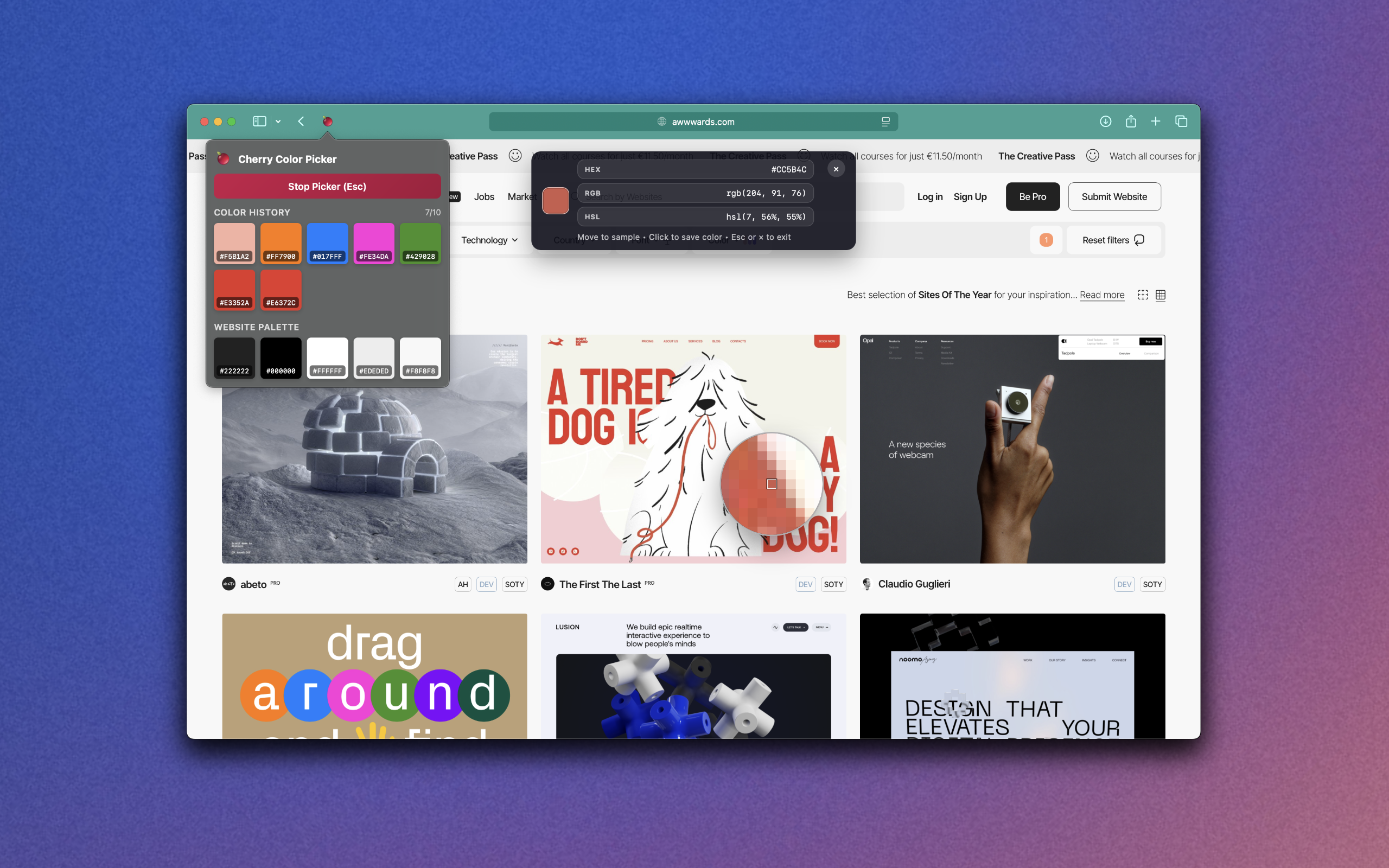
Cherry delivers true-to-pixel sampling with retina compensation, zoom-aware accuracy, and live video capture so the color you see is the color you ship.

Pixel-Perfect Precision

  • 11×11 magnifier loupe with exact pixel focus
  • Retina & zoom compensation for accurate values
  • Dynamic capture handles video, animation, WebGL
  • Guaranteed accuracy from 80%–150% zoom

Professional Color Tools

  • Instant HEX · RGB · HSL conversion & copying
  • Complementary colors via Classic, Perceptual, Inversion
  • Palette history with smart deduplication
  • Extract entire website palettes in one click

Designed for Your Workflow

  • ⌘⇧C (Mac) or Alt⇧C (PC) for instant activation
  • Draggable HUD keeps focus on your canvas
  • Works seamlessly in light and dark modes
  • Safari extension built for pros and teams

Privacy & Performance

  • 100% on-device processing with zero tracking
  • No accounts, logins, or external servers
  • Lightweight engine keeps Safari fast
  • Optimized for retina displays and Apple Silicon
Color Intelligence

Everything you need to pick, compare, and hand off colors with confidence

Cherry was built for creative pros who need accurate values fast. From first hover to final export, every detail accelerates production work.

  1. Press ⌘⇧C or tap the Cherry icon to activate the loupe.
  2. Hover anywhere to preview a magnified 11×11 grid in real time.
  3. Click once to save to your palette and copy HEX, RGB, or HSL instantly.

Complementary color engine

Generate Classic, Perceptual, and Inversion complements to build harmonious systems for product UI, brand kits, and marketing moments.

Palette history that stays organized

Smart deduplication keeps repeated swatches tidy while preserving the full audit trail of every color you capture.

Website palette extraction

Pull dominant hues, gradients, and neutrals from any page to reference brand systems or onboard quickly to new projects.

Workflow

Built for professionals, loved by everyone

Designers, developers, digital artists, marketers, and content creators use Cherry to deliver pixel-perfect work without slowing down.

Design & Product Teams

  • Match brand palettes to production-ready values
  • Share specs instantly with copy-ready formats
  • Export palettes to design systems with confidence

Developers & QA

  • Confirm implementation against brand guidelines
  • Audit state changes and accessibility contrasts
  • Validate animation fidelity frame by frame

Creators & Marketers

  • Generate complementary sets for campaigns
  • Scout palettes from trend sites or inspiration boards
  • Keep social templates consistent across platforms

Why Cherry wins against other pickers

  • Dynamic capture from videos, animations, and WebGL content
  • Complement generation with three pro-grade algorithms
  • Draggable HUD and keyboard shortcuts for frictionless use
  • Privacy-first, zero-data architecture inspires trust
  • Proven performance: live tracking with minimal footprint
Support

Get in touch

Have questions about Cherry? Need help with your color workflow? Our team is here to help you get the most out of your color picker.